How to Choose the Right ERP-Integrated CRM for Your Business
- By ermadmin
14 Jun
Bayram Kont | CRM Consultant | LinkedIn Profile
Many companies now agree that ERP and CRM integration is essential. The real question usually comes next:
Which CRM software will truly work with our ERP system?
Because almost every CRM vendor claims to offer ERP integration. However, when we look at real-world projects, we see that the term ERP integration can mean very different things.
In some projects, only customer records are synchronized.
In others, users can simply view inventory data.
In more advanced implementations, the entire workflow works together—from quote-to-order processes and service operations to credit risk management and customer account management.
For this reason, when selecting an ERP-integrated CRM, the key question is not simply “Does it have integration?” but rather “How much value does the integration bring to our day-to-day business processes?”
Quote-to-order workflows, prospect-to-customer transitions, inventory and credit visibility, service operations, ERP reporting, and management dashboards are all critical factors that directly influence project success.
In this article, we bring together the most important criteria for choosing an ERP-integrated CRM, along with practical insights gained from real-world implementation experience.
A Quick Note on ERP and CRM Terminology
In many companies, ERP systems are often referred to simply as accounting software. In reality, ERP systems manage much more than accounting. They support inventory management, purchasing, order processing, production, logistics, customer accounts, and financial operations across the organization.
Similarly, CRM software is much more than a database for customer records. Modern CRM solutions help organizations manage sales opportunities, quotations, customer interactions, service operations, activities, and customer relationships throughout the customer lifecycle.
Throughout this article, the terms ERP and CRM are used in this broader business context.
What Is an ERP-Integrated CRM?
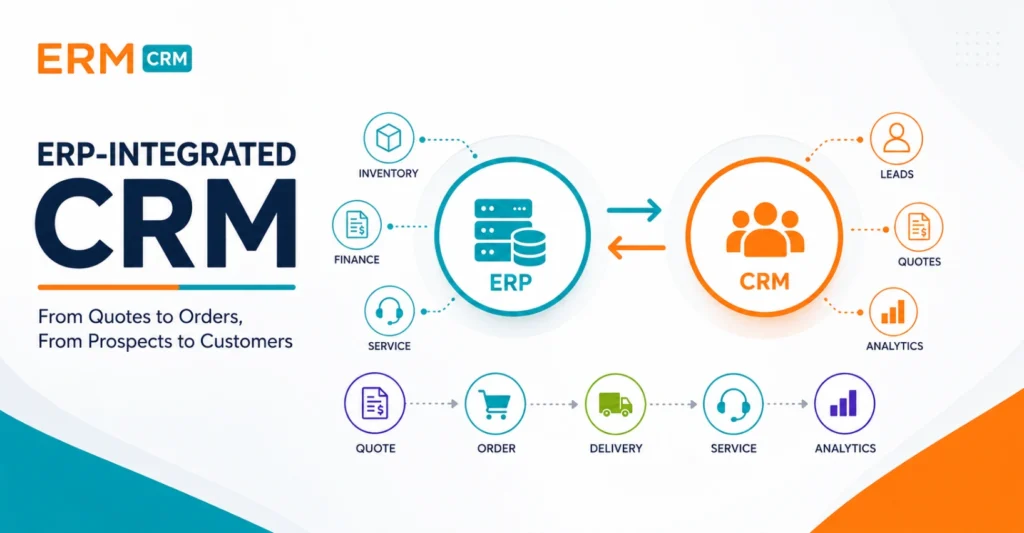
An ERP-integrated CRM is a CRM approach that combines customer-facing processes with operational data stored within ERP systems. In this model, sales, service, and customer-facing teams work within the CRM software, while operational processes such as orders, inventory, customer accounts, shipping, invoicing, and collections continue to be managed by the ERP system.
The goal is not to replace the ERP system with a new platform. Instead, it is to make ERP data and operational information more accessible to sales, service, and management teams.
In successful ERP integration projects, the two systems complement each other, creating process continuity and a unified way of working across the organization.
The 3 Maturity Levels of ERP-CRM Integration
Many CRM software vendors claim to offer ERP integration. However, not all integrations provide the same level of business value.
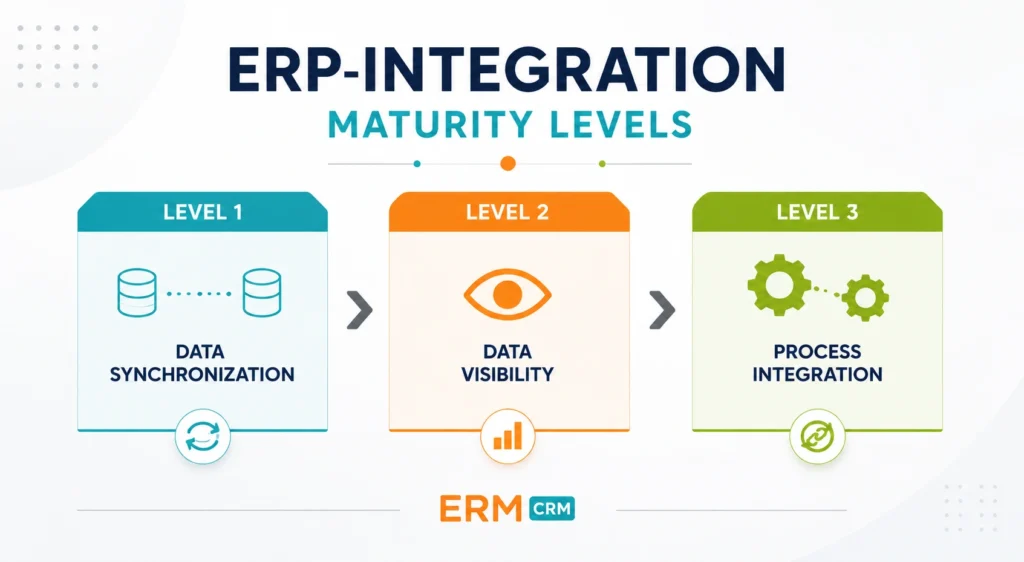
Based on real-world implementation experience, we typically encounter three distinct levels of ERP-CRM integration maturity.
Level 1: Basic Data Synchronization
At this level, customer records, address information, or product data are synchronized between the two systems.
This helps reduce duplicate data entry and improves data consistency. However, it provides limited operational value for sales and service teams.
Level 2: Data Visibility
At this level, CRM users gain access to selected ERP data directly within the CRM software.
Inventory information, customer account transactions, historical invoices, and order records can be viewed without switching systems.
This improves the user experience and increases information accessibility. However, the underlying business processes still operate independently.
Level 3: Process Integration
This is where the real business value emerges.
Quotes can be converted into orders.
Prospects can become customer accounts.
Service reports can be transferred to ERP service orders.
Credit risk information can influence quote and order approval processes.
At this stage, ERP and CRM are no longer two separate systems. They become integrated components of the same business workflow.
For most organizations, this is the level of integration they should aim to achieve when selecting an ERP-integrated CRM solution.
Table: The 3 Maturity Levels of ERP-CRM Integration
| Integration Level | Scope | Business Value |
|---|---|---|
| Level 1: Data Synchronization | Customer accounts, product records, and basic master data are synchronized between systems. | Reduces duplicate data entry and improves data consistency. |
| Level 2: Data Visibility | Inventory information, customer account activity, historical orders, and invoices can be viewed within the CRM software. | Provides easier access to ERP data and improves the user experience. |
| Level 3: Process Integration | Quote-to-order conversion, service order integration, credit risk control, and prospect-to-customer account workflows operate together. | Creates true process continuity and improves operational efficiency. |
While many projects remain at the first two levels, the greatest business value is typically achieved at the third level, where ERP and CRM work together as part of a unified business process.
What Does Real ERP-CRM Integration Add to Daily Business Operations?
The success of a CRM project is not determined by data synchronization alone.
The real value comes from making operational information stored within the ERP system available to sales, service, and management teams as part of their day-to-day decision-making processes.
The best way to understand this is through real-world business scenarios.
Seamless Quote-to-Order Management
In many companies, quotations are prepared within CRM software—or sometimes even in spreadsheets—while order management is handled separately in the ERP system.
This often leads to duplicate work and disconnected processes.
Sales representatives prepare a quote in one system, only to re-enter the same information later when creating an order in the ERP system.
In an integrated environment, however, quotes can be created directly within the CRM software.
When the customer approves the quotation, it can automatically be converted into an order and transferred to the ERP system.
As a result, the entire quote-to-order process operates as a single, uninterrupted workflow.
Managing Orders in CRM and Transferring Them to ERP
Many organizations prefer their sales teams to create orders directly from CRM screens.
The reason is simple: CRM interfaces are often more user-friendly, web-based, mobile-friendly, and better suited to field sales operations.
In successful integration projects, orders can be created within the CRM software, routed through predefined management or financial approval workflows, and then transferred to the ERP system.
This approach preserves the operational discipline of the ERP while providing sales teams with a more agile and efficient working environment.
Enabling Service Operations to Work Seamlessly with ERP
Service teams document their field activities through service reports and work orders. In many companies, however, these records remain disconnected from ERP processes.
As a result, materials used during service activities or billable service items may not be accurately reflected in financial operations.
In an integrated environment, service technicians can enter materials consumed, services performed, and pricing information directly through the CRM software.
This information can then be transferred to the ERP system as a service order and subsequently invoiced through ERP processes.
As a result, service, operations, and finance teams all work from the same set of data.
Sales Teams Need Visibility into Real Inventory Availability
One of the most common challenges in field sales is inventory visibility.
Just because a product appears to be in stock does not necessarily mean it is available for sale.
In manufacturing and distribution businesses, a portion of physical inventory may already be reserved for existing customer orders.
For this reason, sales representatives need visibility not only into physical inventory levels, but also into:
Incoming purchase orders
Inventory reserved for open orders
Expected replenishment quantities
Available-to-promise inventory
In other words, they need access to the inventory that can actually be committed to a customer.
Without this visibility, sales teams may promise delivery dates that cannot realistically be met.
Historical Sales Data Improves Decision Quality
When a customer submits a new request, sales representatives often need access to historical sales information.
Questions such as:
Which customers previously purchased this product?
At what price levels was it sold?
When was the most recent sale?
What were the historical sales volumes?
can significantly influence the quality of a new proposal.
While this information may already exist within the ERP system, making it visible within the CRM software enables sales teams to make faster and better-informed decisions.
This improves pricing accuracy while allowing organizations to leverage their institutional knowledge more effectively.
Credit Risk and Customer Limits Should Be Part of the Sales Process
In many organizations, sales teams still need to contact the finance department before preparing a quote or creating an order.
They need answers to questions such as:
What is the customer’s credit limit?
What is their current credit exposure?
Are there overdue receivables?
How much credit remains available?
What is the customer’s purchase history?
What does the account statement look like?
In a well-integrated ERP-CRM environment, all of this information can be made available directly within the CRM software.
Organizations can even define business rules that automatically prevent quotations or orders from being created for customers whose credit exposure exceeds predefined limits.
Beyond strengthening financial control, this approach also reduces unnecessary phone calls, emails, and manual coordination between departments.

How Should the Customer Lifecycle Be Managed Between ERP and CRM?
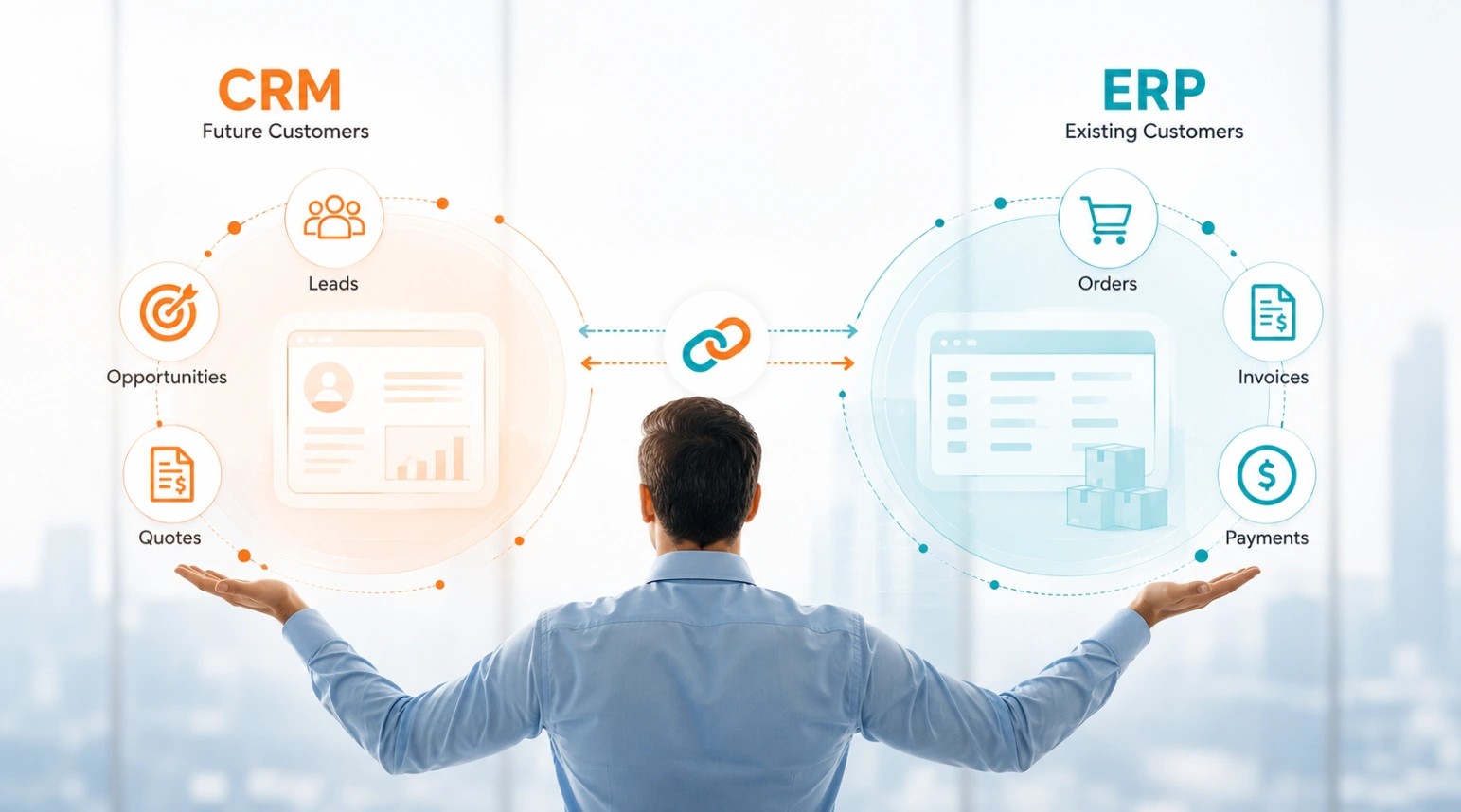
ERP systems typically contain the customers a company is already actively doing business with.
Customer accounts, orders, invoices, collections, and operational processes are managed within the ERP system.
However, the processes that drive business growth often begin outside ERP.
Prospects, new opportunities, potential projects, and sales conversations are not naturally managed within ERP.
This is where CRM software comes in.
1. Prospect and Opportunity Management
This stage naturally belongs to CRM.
Prospects generated through trade fairs, website inquiries, referrals, or field visits can be managed within the CRM software.
Companies that have not yet entered into a commercial relationship do not need to be created as customer accounts in ERP. This helps prevent unnecessary records from accumulating in the ERP database.
2. Quote and Sales Process Management
Customer meetings are held.
Needs are analyzed.
Quotes are prepared.
Alternative scenarios are created.
Revisions are tracked.
Sales opportunities are developed.
All of these processes can be managed within the CRM software.
3. Approval and Customer Account Creation
When the sale is successfully completed, the customer is no longer just a prospect. It becomes a real customer that will be included in the company’s operational processes.
At this point, finance or accounting approval workflows can be triggered through the CRM software. After approval, the customer can automatically be converted into a customer account within the ERP system.
4. Operational and Financial Processes
Orders, shipments, production, invoicing, and collections are now naturally handled within the ERP system.
As the process continues in ERP, the CRM software can also remain updated with relevant operational information.
This approach provides several important advantages.
Unnecessary customer records are not created in ERP.
Sales teams can manage prospect and opportunity processes more effectively.
Management can track the sales pipeline more clearly.
Operational teams work only with customers that have actually been won.
In summary:
CRM manages future customers. ERP manages existing customers.
True integration is the ability to connect these two worlds seamlessly.
Why Is It Important to Access ERP Reports Through CRM?
ERP systems generate highly valuable reports related to sales, purchasing, customer accounts, inventory, and invoicing.
However, these reports are often available only to ERP users.
Yet the information needed by sales teams, service managers, and senior management is frequently stored within those reports.
A sales representative may want to review a customer’s historical sales before a visit.
A regional manager may want to monitor sales performance.
A service manager may want to analyze service intensity by product.
Senior management may want to quickly track current sales, inventory, collections, and profitability indicators.
However, many of these users either do not want to use the ERP system directly or do not have ERP access.
For this reason, high-quality integration is not only about data transfer.
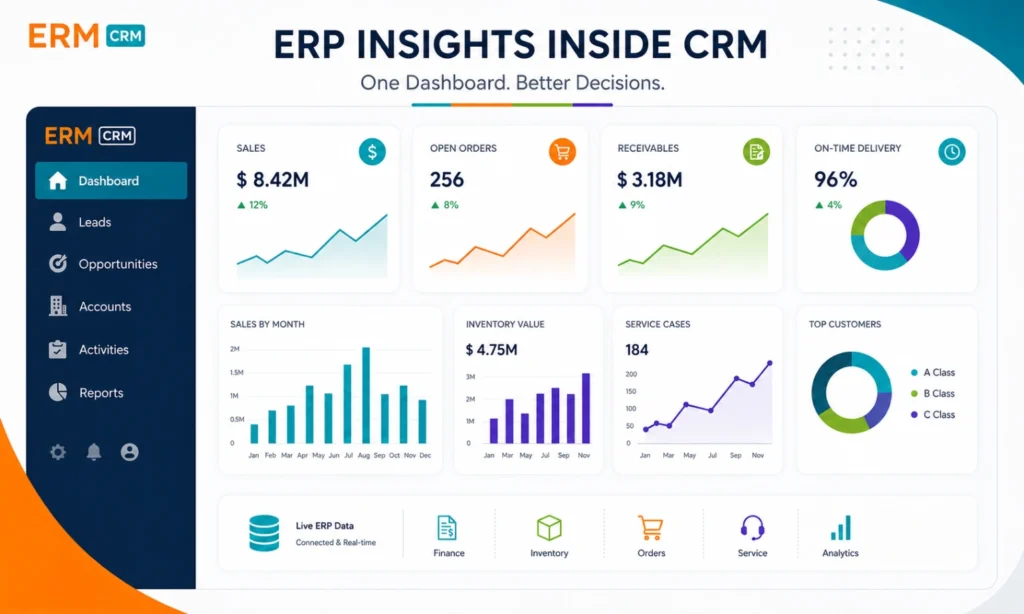
Making critical ERP reports, analytics, and dashboards accessible within the CRM software is also an important part of integration.
Presenting sales reports, purchasing reports, customer account analyses, inventory reports, and invoice analyses within CRM screens enables users to access the information they need faster.
Dashboard structures designed especially for senior management help make ERP data more visible, easier to interpret, and more actionable.

📌 In-Depth Insight
See how a fully ERP-integrated CRM architecture can transform business operations. Explore our guide article prepared in light of 25+ years of field experience.
Can a Cloud CRM Work with an On-Premise ERP System?
Many companies in Türkiye still use on-premise versions of ERP systems such as Mikro, Logo, and Netsis that run on their own servers.
As a result, some executives question whether integration between a cloud-based CRM and an on-premise ERP system is possible.
Today, on-premise ERP systems and cloud CRM solutions can communicate bidirectionally through secure web services, middleware platforms, and API-based integration architectures.
This enables field teams, managers, and users across different locations to securely access ERP data without replacing their existing ERP infrastructure.
User Experience Is Just as Important as Integration
Companies sometimes focus heavily on the technical aspects of integration while overlooking the user experience.
However, the most important question in a successful CRM project is:
“How quickly can users access the information they need?”
If a sales representative must switch back to the ERP system to check inventory availability, if a service technician must navigate multiple systems to view customer history, or if management must collect reports from different platforms, the value created by integration remains limited.
The goal of a successful integration project is not simply to transfer data—it is to simplify the daily workflow of users.
The ERM CRM Approach: Viewing Integration as Process Management, Not Data Transfer
At ERM Information Technologies, our ERP integration philosophy goes beyond technical data synchronization. Built on more than 25 years of field experience, the ERM CRM platform is designed to help sales, service, and operational processes work together within a single business workflow.
Creating True Process Continuity Between ERP and CRM
Common ERP integration scenarios within ERM CRM projects include:
Converting quotes created in CRM into ERP sales orders
Transferring orders entered through CRM into ERP operational workflows
Managing prospects and sales opportunities in CRM and automatically converting won customers into ERP customer accounts
Transferring service reports into ERP service orders
Displaying inventory, credit risk, collections, and historical sales information directly within CRM screens
Providing ERP reports and management dashboards through the CRM interface
These capabilities help organizations create a seamless connection between customer-facing activities and operational processes.
Ready Integrations with Leading ERP Systems in Türkiye
ERM CRM software provides ready-made, cloud-based, bidirectional integrations with many of the ERP systems most commonly used in Türkiye, including Mikro, Logo, and Netsis.
In addition, integration projects have been successfully implemented with ERP platforms such as SAP, IFS, Canias, Uyumsoft, ETA, and Freedom based on specific customer requirements.
As a result, organizations can enhance sales, service, and customer management processes without replacing their existing ERP investments—making operational information more visible, more accessible, and easier to use across the business.
Frequently Asked Questions
Key Questions About ERP and CRM Integration
What Is an ERP-Integrated CRM?
An ERP-integrated CRM is a CRM approach that connects customer management processes with operational data stored in ERP systems. In this structure, sales, service, and customer-facing teams work through the CRM software, while orders, inventory, customer accounts, shipments, and financial processes continue to be managed within the ERP system.
Why Does a Company Using ERP Still Need CRM Software?
ERP systems are strong in operational processes. However, CRM software provides a more agile structure for sales opportunity management, quote processes, customer interactions, activity tracking, and the user experience needed by field teams. When the two systems work together, they create stronger process continuity.
What Is the Most Important Criterion in ERP Integration?
The most important criterion is the scope of integration. Transferring only customer records is often not enough. Quote-to-order conversion, credit risk control, inventory visibility, service processes, and the ability to present ERP reports within CRM determine the real business value of integration.
Can a Cloud-Based CRM Work with an On-Premise ERP System?
Yes. Today, ERP systems such as Mikro, Logo, Netsis, SAP, and similar platforms can communicate bidirectionally with cloud-based CRM solutions through secure web services and API-based integration architectures.
How Should Responsibilities Be Divided Between ERP and CRM?
In general, CRM manages prospects, opportunities, quotes, and customer relationship processes, while ERP manages operational processes such as orders, shipments, production, invoicing, and collections. In successful projects, the two systems are positioned to complement each other.
Our expert is ready, Are you ready to explore ERM CRM?
See our all-in-one CRM solutions at work.
These might interest you.


Last Articles


Categories
- CRM Business (4)
- CRM Software (10)
- Most Read (5)
Archives
- July 2026 (1)
- June 2026 (3)
- October 2025 (1)
- June 2025 (4)
- May 2025 (1)